
Channel behavior
Overview
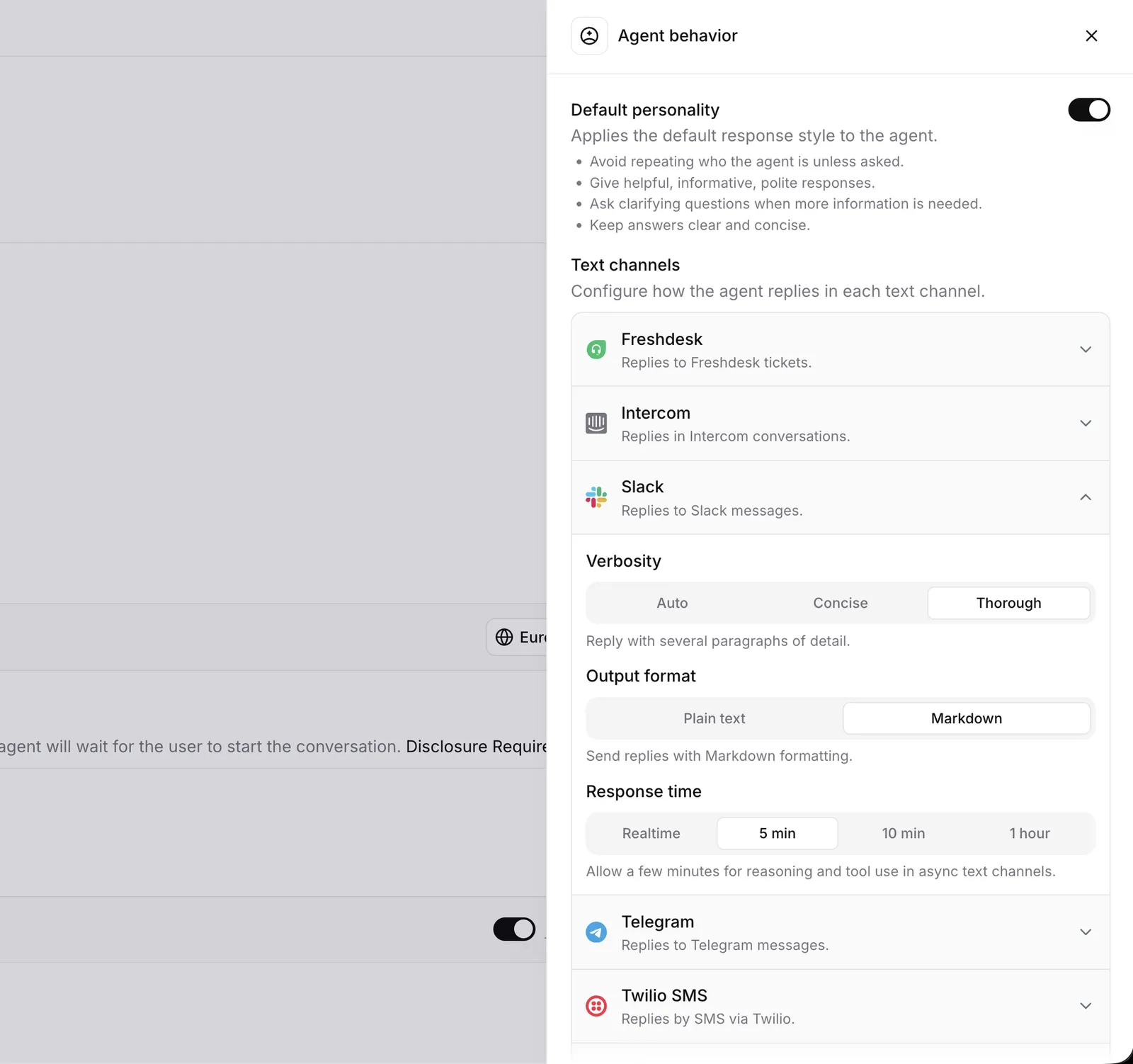
The Agent behavior panel controls the agent’s default personality and how it replies on each text channel: how long replies are, whether they use Markdown formatting, and how much time the agent can spend on a turn. A reply that works well in a live widget chat is often too terse for a Zendesk ticket, and a Slack answer can afford Markdown formatting that an SMS cannot.
Each channel starts from sensible defaults, and you can override individual settings per channel. Voice conversations are not affected: they always use behavior tuned for live calls (concise, plain text replies with a realtime turn budget).
Default personality
By default, a few response style lines are added to the agent’s system prompt to make it helpful out of the box: give helpful, informative, polite responses, ask clarifying questions when more information is needed, keep answers clear and concise, and avoid repeating who the agent is unless asked.
Disable Default personality to remove these lines when your system prompt fully specifies the agent’s tone. In the CLI and API, set conversation_config.agent.prompt.ignore_default_personality to true.
Text channel settings
Verbosity
Controls how long the agent’s replies are.
- Auto: Let the model choose reply length.
- Concise: Reply in a sentence or two.
- Thorough: Reply with several paragraphs of detail.
Output format
Controls whether replies may use Markdown formatting.
- Plain text: Send replies without formatting.
- Markdown: Send replies with Markdown formatting. Use this only on channels that render Markdown, such as Slack.
Response time
Caps the wall-clock time the agent can spend on a single turn, including reasoning, tool calls, and retries. Longer budgets let the agent complete long tool chains at the cost of response latency. In the CLI and API, this setting is named interaction_budget.
- Realtime: Cut turns off quickly to keep latency low for live conversations.
- 5 min: Allow a few minutes for reasoning and tool use in async text channels.
- 10 min: Allow longer turns for long tool chains.
- 1 hour: Allow extended background work for the longest-running tasks.
Channel defaults
Each channel ships with built-in defaults tuned for it. For example, Slack defaults to thorough, Markdown-formatted replies with a longer turn budget, while the web widget defaults to plain text replies with a realtime budget. The dashboard shows the effective defaults for each channel; a channel uses its defaults for any setting you leave unset.
WhatsApp channel behavior applies to text messages only. WhatsApp calls are voice conversations
and use voice behavior. WhatsApp text conversations default to a realtime turn budget — if
your agent runs long tool chains or a slower reasoning model on WhatsApp, raise the
interaction_budget for the channel.
Configuration
Configure channel behavior with the conversation_config.agent.text_behavior_overrides field, a map from channel to the settings you want to override.
Update via the dashboard
Update via the CLI
Update via the API
Open your agent in the dashboard, select the Agent tab, and open Agent behavior. Expand a channel under Text channels and adjust its verbosity, output format, or response time. Save your changes.