

Structured procedures
Overview
A structured procedure is a procedure that runs a fixed sequence of steps. A free-form procedure is natural-language guidance the agent interprets and adapts to the situation. A structured procedure is an ordered list of typed steps the agent runs in order every time the procedure applies.
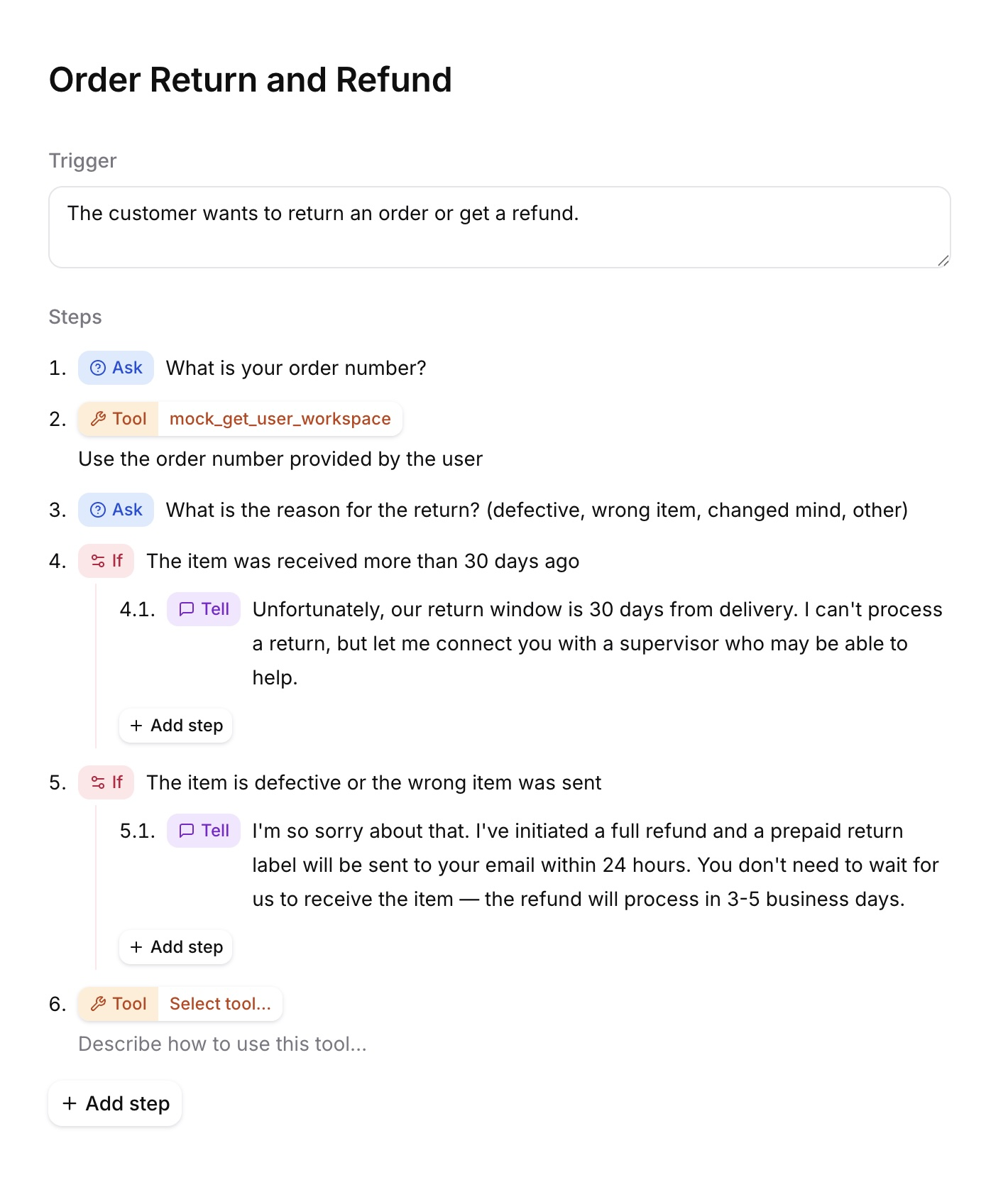
Use a structured procedure when specific steps must happen the same way on every call: verifying a caller’s identity, escalating a ticket, or taking a payment. You author it as a short list of plain-language steps.
Like every procedure, a structured procedure has a trigger that describes when it applies. When a conversation matches the trigger, the agent runs the procedure’s steps in order, then returns to the rest of the conversation.
When to use a structured procedure
Use a structured procedure when specific steps must run the same way every time, but you still want to author quickly in plain steps. For how it compares to free-form procedures, workflows, and the system prompt, see When to use procedures.
Anatomy of a structured procedure
A structured procedure has three parts: a name, a trigger, and an ordered list of steps.
Name
A short label that identifies the procedure in the dashboard. The name is never sent to the LLM, so it does not affect agent behavior.
Trigger
A plain-language description of when the agent should run this procedure, for example When the user asks to refund an order. The agent compares the user’s intent against each procedure’s trigger and runs the matching one, so triggers should be concrete and distinct. A trigger works the same way as for any procedure; see Writing triggers.
Steps
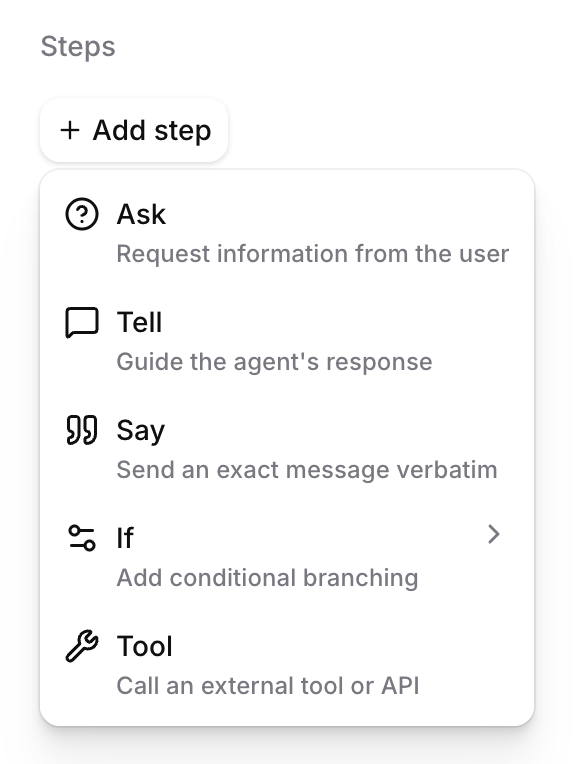
The procedure body is an ordered list of typed steps. There are multiple step types, and you combine them to describe the task.
API step reference
Structured procedure content is a JSON-encoded document containing a steps array. Each step is an object identified by its type.
Ask
An Ask step instructs the agent to request information and wait until the user provides an appropriate response.
- API type:
ask instruction: Required, non-empty string.
Tell
A Tell step instructs the agent to generate a single message in its own words. Unlike Ask, it does not wait for a user response before continuing.
- API type:
tell instruction: Required, non-empty string.
Say
A Say step speaks the supplied text exactly as written.
- API type:
say message: Required, non-empty string.
If, else if, and else
An If step contains one or more ordered conditional arms. The first matching arm runs. The optional fallback array acts as the else arm.
- API type:
branch branches: Required, non-empty list of conditional arms.fallback: Optional list of else steps.- Each arm requires a
conditionand a non-emptystepslist.
This behaves like if/else-if/else:
- Conditions are evaluated in order.
- The first matching arm runs.
- If no condition matches,
fallbackruns. - After an arm finishes, the procedure rejoins the main sequence.
The example above uses a natural-language condition. Conditions can also use workflow expressions:
All arms in one If step must use the same condition type: either llm or expression.
An If step may be the first procedure step. However:
- If steps cannot be nested.
- Two If steps cannot be placed consecutively.
- An expression condition cannot directly follow an Ask step. Use an LLM condition to evaluate a user’s free-text response.
Tool
A Tool step calls a specific tool.
- API type:
tool_call tool_id: Required, non-empty tool ID.tool_name: Required tool name.instruction: Optional instruction describing how to call the tool.on_failure: Optional failure handler.
Without on_failure, a failed tool call stops the procedure. Add on_failure to handle specific failures, retry the tool, or continue with fallback steps.
branches: Optional list of ordered conditions. The first matching branch runs.fallback: Required, non-empty list of steps. It runs when no branch matches.
Failure-handler branches may contain Ask, Tell, Say, Sub-procedure, System tool, and Retry steps. They cannot contain Tool or If steps. All conditional branches in one failure handler must use the same condition type.
Retry
A Retry step reattempts the Tool step whose failure handler contains it.
- API type:
retry max_retries: Optional integer from 1 through 3. Defaults to 1.- The value counts reattempts after the original tool call.
- Retry is valid only inside
on_failure. - Retry must be the final step in its failure-handler branch because subsequent steps would be unreachable.
- If all attempts fail, the procedure stops.
Sub-procedure
A Sub-procedure step runs another structured procedure. When it finishes, execution returns to the step after the Sub-procedure step.
- API type:
sub_procedure procedure_id: Required, non-empty procedure ID.- The target must exist on the same agent.
- The target must be a structured procedure.
- A procedure cannot invoke itself.
System tool
A System tool step performs a built-in system action.
- API type:
system_tool system_tool_name: Required system-tool name.- Currently, only
end_callis supported. More system tools may be added later. - Because
end_callis terminal, it must be the final step in its containing sequence or branch.
Complete API example
This example handles an order cancellation based on shipment status. It retries a failed tool call, invokes another structured procedure, then ends the call.
How a structured procedure runs
When the user’s request matches a procedure’s trigger during a conversation, the agent enters the procedure and runs its steps in order, the same way every time. While inside the procedure, the agent focuses on those steps; when it reaches the end, it returns to where it left off in the conversation.
If a Tool step fails and does not define on_failure, the procedure stops without running the remaining steps. When on_failure is configured, the procedure runs the first matching failure branch or its required fallback. A handled failure continues to the next procedure step unless the selected handler retries the tool, ends the call, or invokes another terminal path.
Manage a structured procedure
Build via the dashboard
Manage via the API
Open your agent in the dashboard, then select Procedures. Use + to create a structured procedure. Add a trigger, select a type for each step, and publish the agent changes.
Best practices
Each step type already enforces its own behavior, so you rarely need to spell it out. Write the intent of each step and let the step type do the rest. The guidance below covers the cases worth getting right.
Writing steps
Let Ask steps wait for the user
An Ask step does not advance until it has asked your question and received an appropriate answer. You do not need a follow-up step to check that the information was collected; the Ask step guarantees it before moving on.
Keep Tool steps to the tool call
A Tool step only runs the tool; the agent cannot speak or make a decision during it. To talk to the user or branch on what the tool returned, put that in a separate step before or after the Tool step.
Choose Tell for phrasing, Say for exact words
Use a Tell step when the agent should compose the message itself, and a Say step when the wording must be verbatim. Both deliver exactly one message, so there is no need to instruct a step to send a single message.
Composing procedures
The general guidance for composing procedures applies to structured procedures too — see Composing procedures on the Free-form procedures page.
One pattern is specific to mixing types: a free-form procedure can reference a structured one. Keep open-ended handling in a free-form procedure and delegate the parts that must run the same way every time, such as identity verification or escalation, to a structured procedure.
Limitations
- If steps cannot be nested, and two If steps cannot be placed back to back.
Model provider support
Structured procedures force internal tool calls when entering a sub-procedure and completing a procedure. Major OpenAI, Anthropic, Gemini, and Grok model families support forced tool choice. Other models or custom providers may not guarantee it, which can make sub-procedure transitions or procedure completion less reliable. Verify forced tool-choice support when using another model provider.
See Procedures for limits that apply to all procedures, including the content size cap and how structured procedures differ from free-form ones.